
Appearance
Roles & Permissions
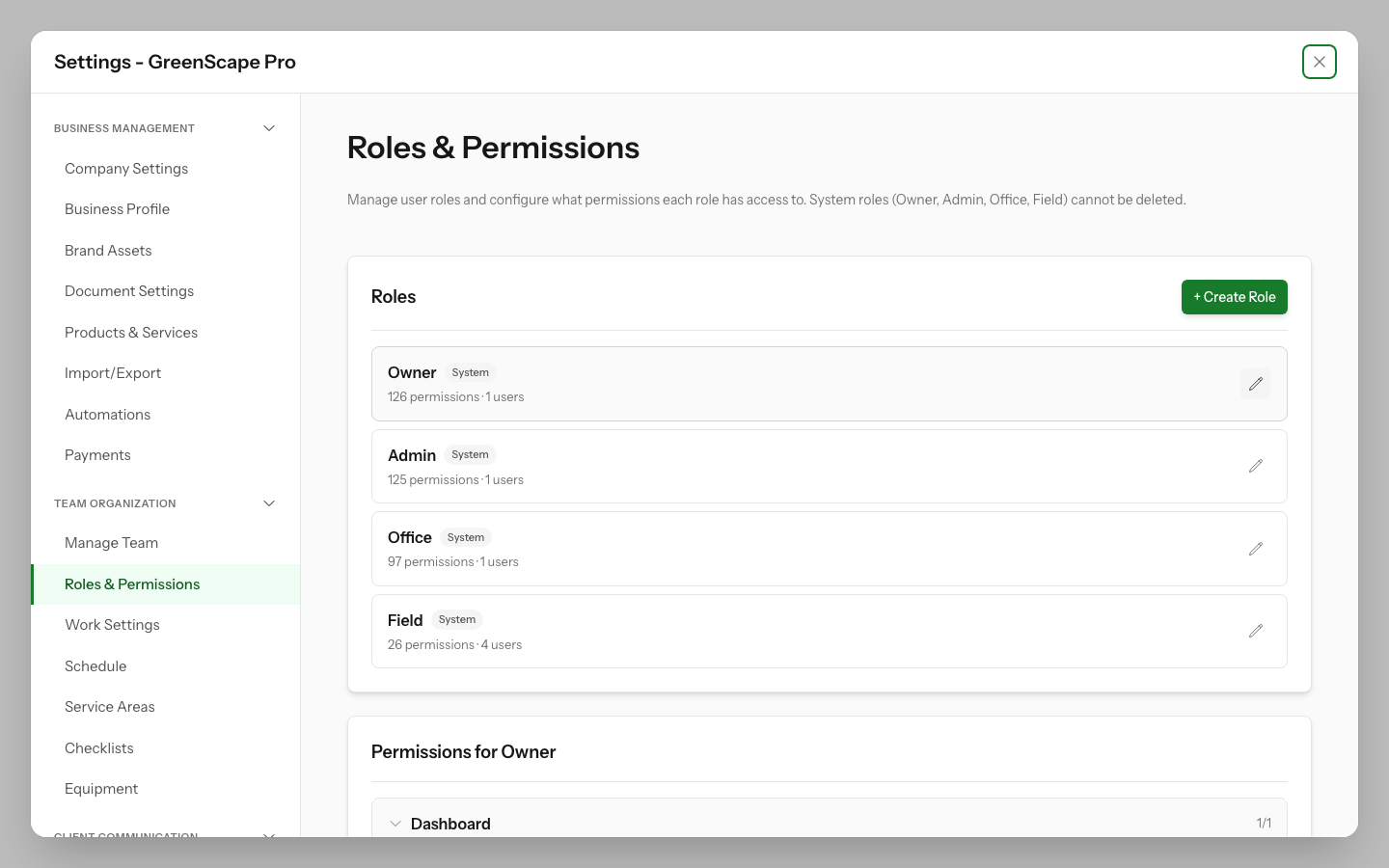
YardPilot uses a permission-based access control system to let you control exactly what each team member can see and do. Every user is assigned a role, and each role has a set of permissions that determine their access.
How It Works
- Permissions are specific actions (e.g., "Create Invoices", "View Reports")
- Roles are bundles of permissions assigned to team members
- System roles (Owner, Admin, Office, Field) come pre-configured
- Custom roles let you tailor access to your business needs
Click to enlarge
System Roles
YardPilot includes four system roles that cannot be deleted. These cover the most common access patterns for field service businesses.
Owner
| Aspect | Details |
|---|---|
| Access | Full access to everything |
| Best for | Business owners, primary account managers |
| Unique abilities | Manage roles & permissions, access billing, delete company data |
The Owner role bypasses all permission checks. There must always be at least one Owner per company.
Admin
| Aspect | Details |
|---|---|
| Access | Everything except two Owner-only permissions |
| Best for | Senior managers, operations directors |
| Restrictions | Cannot manage roles. Cannot confirm payroll |
Admins can invite users, change billing, and run day-to-day operations. They cannot create or edit roles, and they cannot run the Owner-only payroll confirmation step.
Office
| Aspect | Details |
|---|---|
| Access | Full CRM and operations access |
| Best for | Admin staff, schedulers, account managers |
| Key capabilities | Quotes, jobs, invoicing, scheduling, reports |
Office users can quote, schedule, invoice, cancel or pause jobs, and manage automations. They cannot:
- Close, reopen, or delete jobs
- Void invoices or process refunds
- Invite or delete users
- Manage roles
- Confirm payroll
Field
| Aspect | Details |
|---|---|
| Access | Limited to field work operations |
| Best for | Technicians, field workers, contractors |
| Key capabilities | Start/complete visits, log time, view schedules |
Field workers can:
- View assigned work (quotes, jobs, invoices, schedule)
- Create contacts, properties, and work requests on site
- Start, complete, and skip visits
- Log their own time and submit their own timesheet
- View and create their own tasks
- Toggle checklist items on a visit
They cannot create jobs or quotes, convert work requests, or manage team access. The Expenses screen is not live yet, even though the permission exists.
Permission Categories
Permissions are organised into categories that match YardPilot's features:
| Category | What it controls |
|---|---|
| Contacts | Customer records, import/export |
| Properties | Service locations, property details |
| Work Requests | Incoming work requests, conversion to jobs |
| Quotes | Estimates, sending, approval, conversion |
| Jobs | Work orders, assignments, lifecycle |
| Visits | Scheduled work, completion, time tracking |
| Invoices | Billing, sending, adjustments |
| Payments | Recording, allocation, refunds |
| Users | Team member management |
| Teams | Crew groupings |
| Settings | Company configuration |
| Roles | Permission management |
| Schedule | Calendar, routing |
| Reports | Analytics, exports |
For a complete list of all permissions, see the Permission Reference.
Viewing Role Permissions
To see what permissions a role has:
- Go to Settings (gear icon in sidebar)
- Click Roles & Permissions
- Click on any role in the list
- The permission matrix shows all permissions, organised by category
Checked permissions are enabled for that role. The count (e.g., "5/8") shows how many permissions in each category are enabled.
Changing a User's Role
To assign a different role to a team member:
- Go to Settings → Manage Team
- Click on the team member's name
- Select a new role from the dropdown
- Click Save
Changes take effect immediately. The user may need to refresh their browser to see the updated access.
Creating Custom Roles
If the system roles don't match your needs, you can create custom roles with exactly the permissions you want. See Creating Custom Roles for details.
Common Questions
Can I have multiple Owners?
Yes, you can have multiple users with the Owner role. This is useful when multiple people need full control over the business.
What happens when I change someone's role?
Their access changes immediately. Any pages they no longer have access to will show an error if they try to navigate there.
Can Field workers see all jobs?
Field workers can view jobs, but they typically only see jobs assigned to their team. The schedule view shows only their assigned visits.
Why can't I edit certain roles?
Only users with the Owner role can edit the Owner and Admin system roles. Admins can edit Office, Field, and custom roles.
Can I delete a system role?
No, system roles (Owner, Admin, Office, Field) cannot be deleted. You can only delete custom roles that you've created.
Next Steps
- Create a custom role tailored to your business
- View all permissions available in YardPilot
- Add team members to your account